Bankrupt Icons: Evaluating a Vector Icon Set for Modern Projects
In the world of digital and print design, iconography serves as a fundamental visual language. For designers, developers, and content creators, the choice of an icon set can significantly impact the efficiency and aesthetic coherence of a project. One collection that often surfaces in this search is Bankrupt Icons. This set presents itself as a solution focused on simplicity and adaptability, but like any resource, its value depends heavily on the specific context of its use.
The Core Proposition: Simple and Clean Icon Design
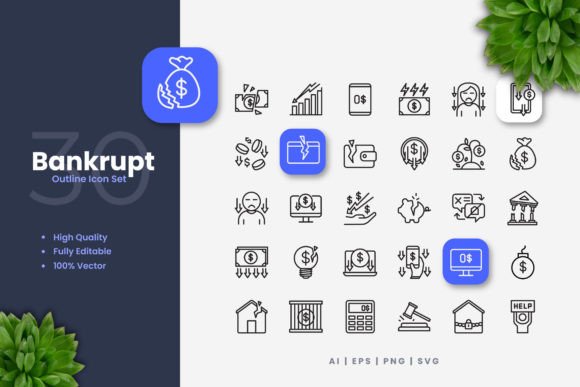
Bankrupt Icons is defined by its foundational principle: simple and clean design. This approach prioritizes clarity and minimalism over intricate detail. The icons are crafted to be easily recognizable at various sizes, a critical factor for their stated suitability across websites, mobile apps, books, and print media like flyers and posters. This stylistic choice is not merely aesthetic; it’s functional. Clean icons reduce visual noise, allowing them to integrate seamlessly into interfaces and layouts without overwhelming the primary content or message.
What distinguishes Bankrupt Icons from many freely available packs is its comprehensive vector foundation. Each icon is provided as a vector graphic, meaning its core geometry is defined by mathematical points and paths rather than fixed pixels. This is a pivotal feature for professionals who require flexibility. As noted, to resize, change color, or edit stroke weight, you can easily edit the icons in vector software like Adobe Illustrator and CorelDRAW. This level of control is essential for branding consistency, where icons must match specific color palettes or scale perfectly from a smartphone screen to a large conference banner.
Understanding the Included Features and Files
A practical evaluation of any digital asset requires a close look at what is actually delivered. The Bankrupt Icons set includes several file formats, each serving a distinct purpose in the workflow.
The inclusion of a source AI file (Adobe Illustrator) and an EPS Version 10 file provides direct access to the native vector data for users of mainstream professional software. The SVG file offers a modern, web-friendly vector format that can be manipulated with code or used directly in web projects. For situations requiring a ready-to-use raster image, the PNG files with transparency are included, facilitating quick drag-and-drop into mockups or non-vector-based applications. A Readme.txt file typically offers basic instructions, which is a standard but helpful inclusion. It’s important to note, as the description clarifies, that a preview mockup is not included, meaning the set focuses solely on the raw icon assets.
Key Stated Features
- High Quality Design: This refers to the professional execution of the simple designs, ensuring clean lines and balanced forms.
- 100 Vector: The entire collection consists of 100 individual vector icons.
- 100 Customizable: Each of those 100 icons can be modified.
- Editable Stroke: The line weight of the icon outlines can be adjusted, allowing for thicker or more delicate appearances.
- Easy Drag and Drop: The PNG files cater to quick, less technical implementations.
Comparing the Vector-Based Approach to Alternatives
When considering icon resources, the market splits broadly into three categories: free raster packs, premium vector sets, and custom-designed icons. Bankrupt Icons sits firmly in the premium vector category. Compared to free raster icon collections (often found as PNG sets), the primary tradeoff is between immediate convenience and long-term flexibility. Free PNGs can be used instantly but become impractical when you need to scale them up significantly or alter their color precisely—they may pixelate or require tedious manual editing. The vector basis of Bankrupt Icons addresses this limitation directly.
Compared to other premium vector sets, the distinction often lies in style and scope. Some collections offer highly detailed, photorealistic icons, while others might specialize in a single thematic area like finance or healthcare. Bankrupt Icons’ emphasis on generic, simple forms makes it a potential candidate for projects requiring a broad, neutral visual vocabulary rather than niche specificity. Its strength is versatility across "many more" applications, as stated, but a potential limitation could be a lack of highly specialized symbols if a project demands them.
Tradeoffs and Decision Factors
The decision to use a set like Bankrupt Icons involves several practical considerations. First is tool dependency. The full customization promise is only viable if you or your team have access to and proficiency with software like Illustrator or CorelDRAW. For users without these tools, the SVG and PNG files still offer utility, but the core advantage of infinite editing is diminished.
Second is style fit. The simple and clean aesthetic is ideal for modern, minimalist, or corporate projects. However, for a brand seeking a playful, hand-drawn, or highly ornate visual identity, this set might feel too austere. In such cases, exploring alternatives with different stylistic personalities would be necessary.
Finally, consider project scale. For a large, ongoing project like a full website suite or an app that will evolve, investing in a customizable vector set can save considerable time and money compared to licensing individual icons or commissioning custom work later. For a one-time, small-scale flyer, using readily available free icons might be a more cost-effective path.
When Bankrupt Icons May Be the Right Choice
This icon collection aligns well with specific scenarios. It is a strong contender for design agencies that need a reusable, adaptable asset library for diverse client work. The ability to tweak colors and stroke weights allows one set to conform to multiple brand guidelines. UI/UX designers prototyping websites or mobile apps can benefit from the vector SVG files for scalable interface elements. Content creators producing a series of infographics or eBooks might find the consistent style and editable nature efficient for maintaining visual coherence across chapters or posts.
A realistic example: a marketing team creating a campaign with materials spanning a social media banner, a printed poster, and an email newsletter. Using Bankrupt Icons, they could take a single "megaphone" icon vector file, color it to match their campaign accent color, scale it appropriately for each medium without quality loss, and ensure a unified symbolic message across all touchpoints.
Recognizing When Another Option Might Be Needed
Despite its strengths, Bankrupt Icons is not a universal solution. If your project requires extremely niche or industry-specific icons—for instance, detailed icons for every tool in a surgical kit or every cryptocurrency logo—a general set of 100 simple icons will likely be insufficient. Here, a specialized icon pack or custom illustration becomes necessary.
Similarly, if your budget or time constraints are severe and you do not possess vector editing skills, the initial investment and learning curve might not justify the use. In such cases, well-curated free icon fonts or raster sets could serve the immediate need adequately. Furthermore, if the visual direction of your project explicitly rejects minimalism—aiming for a vintage, textured, or complex illustrative style—then the clean lines of Bankrupt Icons would be a stylistic mismatch, and alternatives should be sought.
Making an Informed Selection
The key to selecting any design resource is to match its properties to your project's concrete requirements. Evaluate your need for customization, your available software tools, the required visual style, and the scope and longevity of your work. Bankrupt Ions offers a particular blend of simplicity, vector flexibility, and multi-format delivery. For those who value these attributes and operate in environments where they can leverage the editable source files, it represents a pragmatic and reusable resource. For others, whose needs diverge in terms of specificity, style, or technical capacity, the broader market of icon resources will offer more fitting alternatives. By understanding these distinctions, you can make a more confident and efficient decision for your creative or professional undertakings.