The Vector Decorative Typography Bundle: A Designer's Practical Guide
When you hear about a Vector Decorative Typography Bundle focused on holiday celebration words, your mind likely jumps to stunning posters, festive banners, and elegant invitations. This is exactly the promise of such a collection: a curated set of decorative typeset styles, often based on Latin script for headers, designed to give your projects an immediate, trendy lift. Yet, the real value lies not just in the beautiful visuals but in understanding how to leverage these assets correctly. Many creators dive in without considering the technical and practical nuances, leading to frustrating roadblocks. Let’s explore how you can avoid common pitfalls and make this bundle a truly powerful tool in your creative arsenal.
The Core Appeal and Common Oversights
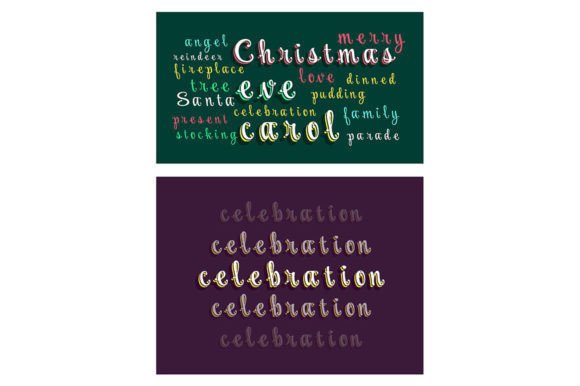
A Vector Decorative Typography Bundle isn't merely a folder of pretty fonts. It's a design system. Each element—from a swirling "Merry Christmas" to a bold "Happy New Year"—is crafted as a scalable vector graphic. This means you can resize it infinitely without quality loss, a crucial feature for projects ranging from small social media graphics to large-scale print banners. The inclusion of file formats like EPS, SVG, PNG, JPEG, and AI speaks to versatility, aiming to serve users across different software and platforms.
A frequent oversight, however, is assuming all formats are equally suitable for every task. For instance, using the provided JPEG for a large print job is a mistake. While convenient for quick placement, JPEGs are raster images; scaling them up will result in blurry, pixelated text, undermining the professional quality your project deserves. The vector files (EPS, SVG, AI) are your primary assets. They preserve the crisp, decorative edges of the typography at any size. Beginners and even seasoned professionals rushing to meet a deadline sometimes grab the easiest file, not the best one, compromising the final output.
Choosing the Right Format and Application
Before you even open a file, consider your end medium. If you’re creating a web banner or digital invitation, the SVG or PNG (with a transparent background) might be ideal. For professional print or extensive editing within Adobe Illustrator, the AI or EPS files are indispensable. Another subtle mistake involves editing complexity. These bundles often present the typography as single graphic elements, not as live, editable text. You cannot change the phrase "Season's Greetings" to "Happy Holidays" by simply typing—the words are artistic illustrations. This requires a bit more planning: you must select the graphic element that contains the exact message you need.
A better approach is to treat the bundle as a library of pre-designed headlines. Browse the collection first, identify the specific holiday celebration words and decorative styles that match your theme, and then import the corresponding vector file into your layout. This avoids the frantic last-minute search for a phrase that isn't included. Furthermore, check the compatibility of the EPS or AI files with your version of design software. An outdated file format might not open correctly in newer applications, causing unnecessary delays.
Beyond the Download: Integration and Customization
Many users download a Vector Decorative Typography Bundle, use one element for a single project, and then forget about the rest. This is an underutilization of a potentially rich resource. These bundles are often part of a larger offering where creators provide vector brochures, infographics templates, and customizable elements. The decorative typography can be the perfect headline component for these templates, creating a cohesive design language across your entire campaign.
A practical piece of advice is to dissect the graphics. Since they are vector-based, you can often ungroup elements in software like Illustrator. Perhaps you only love the decorative flourish around a particular word. You can isolate that flourish and repurpose it as a border or accent elsewhere in your design, extending the value of your purchase. This moves you from simply using a pre-made graphic to actively customizing and integrating it into your unique visual identity.
Another overlooked detail is color. Vector graphics are typically provided in a single color or as outlines. This is a feature, not a limitation. It gives you complete control to fill them with any palette that suits your project. A common error is leaving them in the default black, making them feel stark or disconnected from your festive color scheme. Take the time to recolor the typography to harmonize with your background, images, and overall design mood. This simple step transforms a stock asset into a tailored design element.
Subscription and Staying Updated
The promise of "new graphics every week" through a subscription model is attractive, but it requires a proactive mindset. Subscribing to stay updated is excellent for maintaining a fresh asset library, but it's easy to let the weekly downloads accumulate unused. The mistake here is passive collection. Without a system to organize and periodically review new additions, you might miss a perfect decorative type set for a future project.
A constructive approach is to dedicate a brief monthly review session. When new typography bundles or graphics arrive, quickly categorize them (e.g., "Winter Holidays," "General Celebration," "Elegant Script"). Add brief notes on their style in a simple spreadsheet or use your design software's library features. This turns a flood of files into a curated, searchable database. It also helps you recognize the evolving trends in decorative typeset styles, ensuring your work remains contemporary without you having to constantly hunt for new resources.
Evaluating Quality and Fit Before Purchase
Not all Vector Decorative Typography Bundles are created equal. Before committing, you should check a few key aspects. First, scrutinize the sample images or previews. Are the holiday celebration words rendered clearly at different sizes? Does the decorative style feel cohesive, or is it a random assortment of mismatched designs? Look for bundles that show the typography in application contexts—on mock posters or banners—so you can visualize its real-world use.
Second, investigate the file format details explicitly. A bundle offering only PNGs lacks the scalability essential for serious design work. Ensure the vector formats (AI, EPS, SVG) are truly included. Third, consider the license. Can you use these assets for commercial client work? For merchandise? Clear licensing prevents future legal headaches and ensures your investment is sound for your professional needs.
Finally, assess if the bundle's style aligns with your typical projects or target audience. A bundle full of ultra-modern, abstract decorative typography might not suit a traditional, family-oriented holiday campaign. By taking these evaluation steps, you move from an impulse buy based on a single attractive preview to a strategic acquisition that will serve you reliably across multiple seasons and projects.
A Sustainable Approach to Creative Resources
In the end, a Vector Decorative Typography Bundle is more than a quick fix. It's a component in a sustainable design practice. By understanding its technical strengths (vector scalability), practical limitations (non-editable text phrases), and integration potential (with templates and custom elements), you empower yourself to create efficiently and with higher quality. Avoiding the common rush to use the easiest file, or to let assets lie dormant, transforms a simple download into a dynamic toolkit.
Remember, the goal is effective communication and beautiful presentation. These decorative assets are your allies in achieving that, provided you apply them with mindful intention. Start by selecting the correct vector format for your project's scale, customize the colors to fit your palette, and integrate the typography as a key element within a broader design framework. With this approach, your holiday celebration words will not only look trendy but will also carry a professional polish that resonates with your audience, whether they are clients, customers, or community.