Visualizing Digital Safety with a Modern Icon Collection
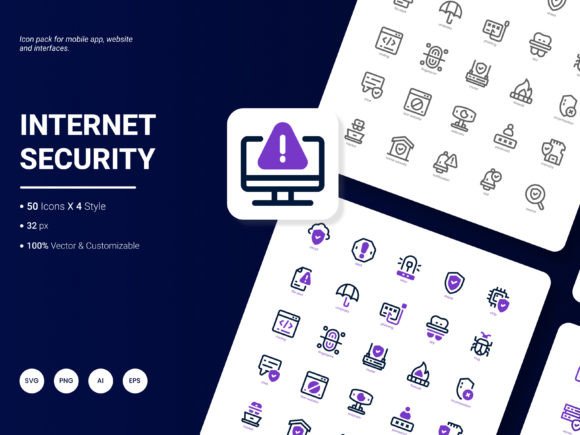
In today's digital landscape, conveying concepts of security, privacy, and trust is paramount. Whether you're building a website for a VPN service, designing a mobile app for secure messaging, or creating a presentation on data protection regulations, you need visuals that instantly communicate these ideas. This is where a specialized visual toolkit becomes invaluable. The Internet Security Icon Pack provides exactly that: a curated set of 50 symbols designed to represent the most prevalent services and concepts in the realm of online safety.
A Practical Resource for Modern Communicators
Imagine you're a marketer tasked with creating an infographic about cybersecurity best practices for a small business client. You need icons for concepts like "firewall," "encrypted data," "malware," and "secure login." Scouring free icon sites for each individual concept is time-consuming and often yields mismatched styles. The Internet Security Icon Pack consolidates these needs into one coherent collection. With icons that are "amazingly fresh and trendy," they align with contemporary design expectations, helping your materials look professional and current rather than dated or generic.
The value here is efficiency and cohesion. Instead of piecing together visuals from disparate sources, you have a single, consistent library. This saves significant time in the design phase and ensures that your final product—be it a website, app interface, or report—has a unified visual language. This consistency strengthens communication, making complex topics more accessible and digestible for your audience.
Flexibility Across Formats and Projects
A key strength of this pack is its practical adaptability. The icons are available in six formats: AI, EPS, SVG, PNG, PDF, and JPG. This variety directly supports different workflows and end uses. For a web developer, the SVG files are crucial for scalable, crisp integration into a responsive website. For a graphic designer working in Adobe Illustrator, the AI and EPS formats allow for deep, vector-based editing. If you're a blogger preparing a PDF guide, the PNG or PDF icons can be seamlessly placed.
The "editable" feature is particularly important for professionals who need to tailor assets to a specific brand. You can adjust colors to match your company palette, modify line weights, or even combine elements. This flexibility means the pack isn't just a static product; it becomes a foundational component you can mold to fit your unique project requirements.
Who Benefits Most from This Toolkit?
Several groups will find this icon pack especially useful. Entrepreneurs and small business owners developing their online presence can use these icons to build trust on their websites, clearly signaling security features on e-commerce or client portals. UI/UX designers and app developers gain a ready-made set of symbols for interfaces dealing with authentication, settings, and security warnings, speeding up their prototyping and design phases.
Educators and content creators, such as bloggers or publishers focusing on technology topics, can enhance their tutorials, articles, and presentations with clear, attractive visuals. Analysts and consultants preparing reports on IT security or data privacy can use the icons in charts and infographics to make dense information more engaging. Essentially, anyone who needs to communicate digital safety concepts visually, without being a specialist graphic designer, stands to gain.
The Four Styles: Matching Tone and Context
The inclusion of four distinct styles within the Internet Security Icon Pack is a thoughtful feature that addresses different project tones. A sleek, minimalist line style might be perfect for a clean, professional analytical report. A more solid, filled style could lend weight and emphasis to a mobile application's critical security alerts. Having style options allows you to match the icon's aesthetic to the overall mood of your project—whether it needs to feel technical, approachable, authoritative, or modern.
This consideration helps solve a common problem: finding icons that not only represent the correct concept but also fit the visual design system you're already using. It simplifies the decision-making process, as you can explore which style integrates most smoothly with your existing templates or brand guidelines.
Thoughtful Integration and Potential Limitations
While the pack covers "popular content," it's wise to consider your specific needs. The 50 icons are designed around the most common services and ideas. For extremely niche or emerging security concepts—perhaps related to a specific new blockchain protocol or a rare type of threat—you might need to supplement or create a custom icon. The pack is a robust foundation, not an exhaustive encyclopedia of every possible term.
Furthermore, the "trendy" design is a benefit for most contemporary projects, but if you are working on a project with a deliberately retro or highly ornate aesthetic, these modern icons may not blend in seamlessly. It's always good practice to review the icon styles against your project's overall art direction.
Supporting Creativity and Professional Outcomes
Ultimately, a resource like the Internet Security Icon Pack serves as a catalyst for better work. It removes a logistical hurdle—finding appropriate, high-quality visuals—freeing up time and mental energy for the more substantive aspects of your project: the content, the strategy, the user experience. For a freelancer juggling multiple clients, this time saving translates directly to increased productivity. For a team within a larger company, it ensures visual consistency across materials, strengthening brand communication.
By providing editable, multi-format files, the pack respects the creative process. It gives you the raw materials and the tools to adapt them, supporting your goals rather than constraining them. The request to "write to us if you have any suggestions on what we should include in our next update" indicates an evolving resource, one that aims to grow based on real user needs, making it a practical investment for those regularly working in this thematic space.
When evaluating visual assets, the true metric is how effectively they help you convey your message and achieve your project's objectives. A focused, well-produced icon pack dedicated to internet security concepts does precisely that, offering a blend of immediate utility and long-term adaptability for a wide range of professional and creative endeavors.